NFC (Near Field Communication) technology is an excellent solution for fast, reliable, and economical equipment management. It relies on small electronic tags, attached to the equipment, which can be read instantly by simply bringing a smartphone or NFC reader close to them.
With NFC, there’s no need to search for serial numbers, scan often-faded barcodes, or use paper forms. Reading is almost immediate (less than one second), saving valuable time during inventories, checks, inspections, or equipment loans.
It’s also a highly reliable technology, as the tags are designed to withstand harsh environments (shocks, dust, humidity) and are tamper-proof within an internal management framework. Their identification is unique and unambiguous, significantly reducing errors and losses.
Finally, it’s an economical solution, as the tags are inexpensive per unit and can be read with smartphones already in circulation, avoiding heavy investments in hardware. It integrates easily with existing software and does not require complex maintenance.
To implement it, simply: choose tags suited to your usage conditions, attach them to the equipment, then configure your application to associate each tag with the corresponding equipment. In a few hours, your fleet will be ready for efficient management.
We’ll explain everything in this NFC guide.
1 - Identify the Equipment to Track
List the equipment for which you want to:
- track periodic maintenance/inspection,
- ensure regulatory compliance,
- prevent loss and theft,
- simplify inventories.
Examples: safety harnesses, fire extinguishers, machines, tools, vehicles, PPE…
Tags come in the form of stickers, discs, rivets, bracelets, or metal plates.
You must choose tags that are:
- resistant to your environment (heat, vibrations, dust, chemicals…),
- suitable for the surface (metal, plastic, wood…),
- with secure fastening to prevent easy removal.
3 - Label Your Equipment
Stick or fasten the NFC tags in a visible location but protected from wear. Some models are designed to be read even on metal surfaces or under mechanical stress.
The NFC tag typically only contains an identifier. All useful data (purchase date, status, last inspections, photos, documents) are stored in a PPE management software or in the cloud.
Many solutions like GearTracker exist (SaaS, ERP, CMMS, or specialized applications) that allow you to:
- associate each tag with an equipment record,
- schedule inspections and send reminders,
- record inspection results directly from the phone,
- generate reports compliant with legal obligations.
5 - Train Users
Explain to teams how to use smartphones to read a tag and follow the procedure. Training is generally very quick.
What is NFC Technology and How Does It Work for Equipment Identification?
NFC stands for Near Field Communication.
It’s a wireless technology, derived from RFID, that allows two devices or a chip and a reader to communicate over a very short distance (generally < 4 cm).
It’s already widely used in daily life, for example:
- for contactless payment with a bank card or phone,
- for validating a transport ticket,
- for exchanging small pieces of information between devices.
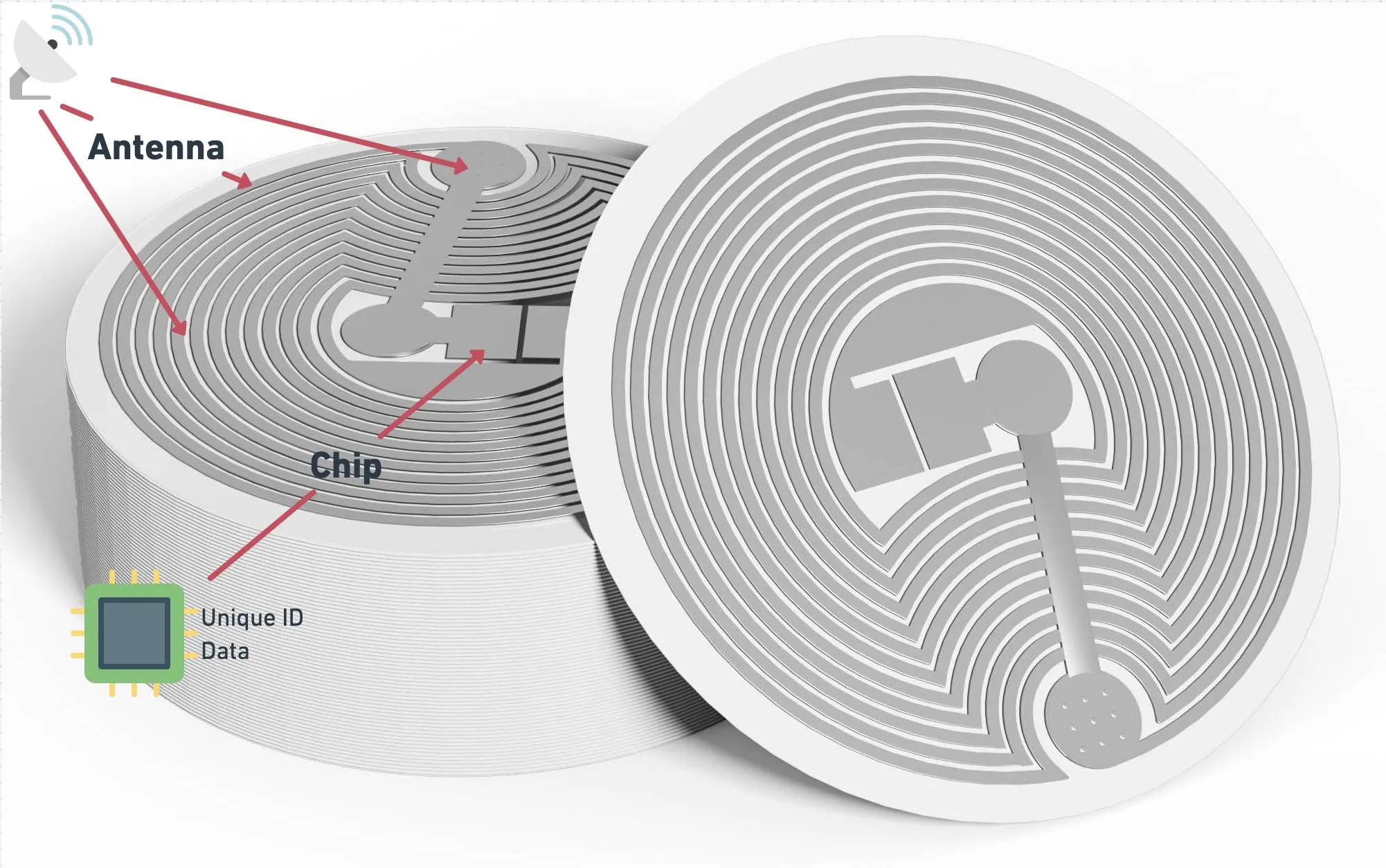
These tags are small electronic chips glued or integrated into the equipment. They contain a unique identifier (and sometimes some additional information) that can be read by a smartphone or an NFC reader.
- An NFC tag is affixed to each piece of equipment:
- The tag contains a unique and immutable identifier, etched into its memory. This identifier will be associated in your software with the equipment’s descriptive record.
- When an NFC reader (or a smartphone) is brought close to the equipment, the tag is powered by the reader’s electromagnetic field, and it sends back its identifier.
- The software immediately identifies the equipment using this identifier and displays its record, history, status, etc.
Here are examples of types of equipment that can be tracked or identified using NFC tags:
| Equipment Category | Examples | Specifics |
|---|
| PPE (Personal Protective Equipment) | Helmets, harnesses, gloves, glasses, shoes, masks, flame-retardant clothing | Require robust tags, resistant to wear and heat. |
| Industrial Tools & Equipment | Drills, grinders, ladders, scaffolding, overhead cranes, hoists, slings, welding stations | Tags for gluing, riveting, or integrated to resist shocks and dust. |
| Machinery & Vehicles | Forklifts, excavators, trucks, car fleet | Can be integrated into a metal plate or glued under the dashboard. |
| Safety Equipment | Fire extinguishers, smoke detectors, defibrillators, first aid kits, alarms | Useful for periodic checks and inventories. |
| Technical & IT Equipment | Computers, printers, servers, network racks, projectors | Discreet tags (often stickers) to not hinder aesthetics. |
| Furniture & Movable Assets | Adjustable desks, ergonomic chairs, cabinets, meeting tables | Allows tracking of furniture assets and assignments. |
| Scientific & Medical Instruments | Scales, microscopes, medical pumps, monitors | Washable or sterilizable tags for the medical sector. |
What is the Difference Between NFC and Classic RFID for This Type of Use?
The main difference between NFC and “classic” RFID lies in the reading distance and how the technology is used. NFC is a specific version of high-frequency RFID, designed for very close (a few centimeters) and secure interactions, ideal when you want to identify objects one by one, with a simple smartphone or a small reader, for example to check PPE during an inspection.
Conversely, classic RFID (especially the UHF version) is designed for longer-range readings (several meters) and can identify tens or hundreds of tags at the same time, making it more suitable for mass inventories or logistics. NFC is therefore simpler and more accessible for individual uses, while UHF RFID is more powerful for industrial and rapid operations on large volumes.
| Characteristic | NFC (Near Field Communication) | “Classic” RFID (HF/UHF) |
|---|
| Frequency | High frequency (13.56 MHz) | Can be low (LF ~125kHz), high (HF 13.56MHz), or ultra-high (UHF 860–960MHz) |
| Reading Distance | Very short (2–10 cm) | LF: ~10 cm / HF: ~1 m / UHF: up to 10 m or more |
| Direction / Orientation | Requires alignment and close contact | More tolerant (especially UHF), can read remotely and in bulk |
| Reader Hardware | Present in almost all recent smartphones | Specific readers, often more expensive |
| Multi-reading (Mass Inventory) | No (1 tag at a time) | Yes (especially UHF, can read tens/hundreds of tags simultaneously) |
| Cost of Tags | Generally more expensive than UHF (but low) | LF: expensive / HF: moderate / UHF: very cheap for volume |
| Typical Uses | Payment, access badges, unique identification, proximity object tracking | Logistics inventory, traceability, access control, mass inventory |
| Advantages | Simple, standardized, smartphone compatible, secure | Remote reading, in bulk, faster for large volumes |
| Disadvantages | Requires proximity, slower, no mass reading | Requires specialized hardware, more sensitive to interference (UHF) |
✅ In short: Yes, they can be reliable, provided the right tag is chosen and installed correctly.
Here are some points to know:
| Environmental Factor | Impact & Solutions |
|---|
| Dust & Dirt | Dust does not interfere with NFC reading as long as the tag remains accessible. |
| Humidity / Water | Water can slightly attenuate radio waves (especially if the tag is directly in water), but for equipment exposed to rain or high humidity, there are waterproof tags (IP67, IP68) designed to work even submerged. |
| Heat & Temperature Variations | The chips themselves generally support temperatures between -25 °C and +70 °C for standard models, or even more for industrial versions. Some tags are designed for environments > 150 °C (foundries, engines, etc.). |
| Shocks & Abrasion | In environments with a lot of friction or shocks, it’s preferable to use rigid tags in sturdy housings, or to place them in protected areas. |
NFC tags attached to equipment generally have a lifespan of over 10 years, provided they are suitable for the environment in which they are used. The electronic chip, which contains the data, is very durable and can operate for several decades, but the actual longevity primarily depends on the quality of the tag’s encapsulation and its fastening method. External aggressions such as heat, humidity, chemicals, friction, or UV exposure can deteriorate the tag or its adhesive, thus reducing its lifespan.
To ensure good longevity, it is therefore important to choose a tag designed for the specific conditions of the equipment (industrial, outdoor, chemical, etc.) and to use a strong and appropriate fastening system.
| Aspect | Typical Values |
|---|
| Electronic Chip | Approximately 10 to 20 years (the chip itself doesn’t wear out as long as it’s not exposed). |
| Memory (EEPROM) | Can support between 10,000 and 100,000 write cycles, much more in reading. |
| Material and Encapsulation | This is often the most fragile part: between 3 and 10 years in a “normal” environment, and sometimes less in very harsh conditions (heat, UV, abrasives, chemicals). |
| Adhesive or Fastening | Often the weak point: if poorly chosen for the support or conditions, it can fail in a few months. With a suitable adhesive or glue, several years are possible. |
No, NFC tags do not require an internal power source (battery or accumulator) to function. They are passive tags that draw the necessary energy for their operation directly from the electromagnetic field emitted by the NFC reader when they are in close proximity (like a smartphone, for example).
In summary:
- The NFC reader generates an electromagnetic field.
- The tag captures this field and uses this energy to respond by sending its data.
- No active components or batteries are needed in the passive tag.
This makes NFC tags particularly reliable, lightweight, inexpensive, and durable over time, as the absence of a battery eliminates the risk of power-related failures.
NFC tags can be read with a standard smartphone provided the smartphone is equipped with an NFC chip — which is the case for most recent smartphones (Android and iPhone from model 7 onwards, for example).
No dedicated reader is needed in most cases, as the smartphone itself acts as an NFC reader. You generally just need to:
- activate NFC in your phone settings,
- bring the smartphone close to the NFC tag (often within 4 cm),
- an application or the native system will detect the tag and display information or launch an action.
On a classic computer (PC or Mac), most machines do not have an integrated NFC chip like smartphones.
So, to read NFC tags with a computer, you generally need a dedicated external NFC reader, connected via USB or sometimes Bluetooth.
Options for computers:
- USB NFC Reader: a small device plugged into a USB port, recognized as a peripheral.
- Bluetooth NFC Reader: for more mobility, but less common.
- Specialized Laptops: some professional models (quite rare) integrate an NFC module, but this is rather the exception.
To attach NFC tags to metal equipment or equipment subject to vibrations, several constraints must be considered to ensure good adhesion, reliable reading, and maximum durability. Here are the recommended best practices:
Use “on-metal” NFC tags: These tags are designed with an isolated antenna and a ferrite material that prevents interference with metal. They ensure correct reading even when placed on a metal surface.
Suitable Fastening Methods
- High-performance industrial adhesives: Use industrial double-sided tape (e.g., 3M VHB) compatible with metal and resistant to vibrations, shocks, and outdoor conditions (humidity, temperature).
- Epoxy bonding: For a very strong bond, especially on difficult surfaces, epoxy resin can be used, but be aware of its permanence (harder to remove).
- Screws or riveting: If the tag has a hole or a mounting point, fasten it mechanically (screws, rivets) to ensure a very solid attachment in a high-vibration environment.
- Dedicated housings or mounts: Place the tag in a plastic housing or a mount mechanically attached to the equipment.
What glue, screws, or support is recommended for durable NFC tag attachment?
The durable attachment of an NFC tag depends on the surface (metal, plastic, textile, wood, etc.), the constraints (shocks, vibrations, UV, chemicals, washing, etc.), and whether it needs to be removable.
| Surface | Recommended Solution | Advantages | Disadvantages |
|---|
| Metal | Screws/rivets + encapsulated tag or special metal VHB adhesive | Very strong | Requires drilling |
| Plastic / wood | VHB adhesive or epoxy glue | Easy to apply | Difficult to remove |
| Textile / strap | Stitching, rivets, cable ties, flexible tag + heat-shrink sleeve | Removable possible | Less discreet |
| Exposed areas (shock, washing) | Screws + rigid encapsulated tag | Very durable | Drilling required |
Do I need to provide a specific location on the equipment to place the tag?
Yes, it is highly recommended to provide a specific and well-defined location on each piece of equipment to place the NFC tag. Here’s why and how:
- Accessibility: The tag must be easily accessible for reading with a smartphone or an NFC reader, without having to disassemble or move the equipment.
- Protection: The location must protect the tag from shocks, friction, humidity, or other mechanical and environmental aggressions.
- Reliable fastening: A flat and clean surface facilitates good tag adhesion, preventing it from detaching over time.
- Non-interference: On metallic equipment, avoid sticking the tag directly onto a metallic surface without an insulating layer (like a special adhesive), as this greatly reduces the NFC signal’s range and reliability.
- Standardization: Always placing the tag in the same spot on similar equipment facilitates user training and speeds up inspections. Give it a distinctive appearance and color.
No, it’s generally not complicated to train teams to use NFC tags, especially if done properly.
Reading an NFC tag often involves simply bringing a smartphone or an NFC reader close to it, without complex actions.
However, it’s important to:
- Choose a clear and suitable application or tool like Geartracker for example (no need to install an app on the employee’s phone).
- Train on best practices (e.g., how to scan correctly, where tags are located, what to do in case of an anomaly).
- Provide initial support to users, with a Q&A phase.
To manage information related to NFC tags, it is recommended to use a software or an application capable of centralizing and organizing data , rather than storing too much information directly on the tag. Indeed, NFC tags have very limited storage capacity (generally only a few hundred bytes), which makes it impractical to write all detailed equipment data on them.
The ideal approach is to write a simple, unique piece of data, such as an identifier or code, onto the NFC tag. This will serve as a key to retrieve all complete information from a dedicated application. For example, with a solution like GearTracker , each NFC tag is associated with a piece of equipment in the database. By scanning the tag, you instantly access the history, inspection dates, notes, or any other important detail via the application, without overloading the tag itself. This is exactly how the Luxembourg distributor Reinert now offers it to its own customers, under the name GearTracker by Reinert .
Furthermore, it’s recommended to have software that allows direct access from the tag to certain critical information, especially maintenance status or inspection validity, without needing to open the application. This feature is important because it’s a legal requirement: employees must be able to easily consult, on-site and without complex tools, the safety status and maintenance of the equipment they use. This ensures transparency, regulatory compliance, and most importantly, daily safety.
Can NFC tag reading be integrated with my existing software (ERP, CMMS, etc.)?
Yes, it’s entirely possible to integrate NFC tag reading with existing software like an ERP, CMMS, or any other management system, provided these software solutions have APIs or extension capabilities.
Prioritize software like Geartracker that include this functionality by default. Otherwise, here are the key points for successful integration:
-
Interfacing via API or Webhooks
Your NFC reading application (or your Geartracker solution) can expose REST or GraphQL APIs that allow exchanging reading data (tag ID, equipment status, inspection history, etc.) with your ERP/CMMS. Conversely, the ERP can also send data to your application for updates.
-
Middleware or Connector
It is often useful to develop a connector or middleware that will translate the data format from NFC tags to the format expected by the ERP/CMMS. This connector can be a small application, a script, or a plugin.
-
Data Standardization
To facilitate integration, you need to ensure that the information stored or retrieved via NFC is standardized (e.g., unique identifiers, standardized codes, clear status, inspection dates, etc.) and compatible with your ERP/CMMS data models.
-
Compliance with Security and Confidentiality Constraints
Data exchange between the NFC system and the ERP/CMMS must be secure (authentication, encryption) and comply with data protection rules (especially GDPR).
The counterfeiting of NFC tags is a problem often discussed in areas like access control, where strict security is paramount. However, in the context of equipment management, this is generally not the primary concern.
Indeed, anyone can replace or modify a label, whether it’s an NFC tag or simply a paper sticker. The real challenge here is not so much to encrypt or cryptographically secure the NFC chip, but rather to ensure that the tag is firmly and durably attached to the equipment to prevent it from being easily removed or replaced.
Furthermore, to meet legal requirements, particularly transparency regarding critical information such as the maintenance status of machines or equipment, this data must be easily and reliably accessible. This is often incompatible with overly closed or encrypted systems, which could limit access to this information by users or inspectors.
No, NFC tags do not allow real-time tracking of equipment location.
Here’s why:
- NFC (Near Field Communication) is a wireless communication technology with a very short range, generally between 4 and 10 cm.
- An NFC tag is passive: it has no battery or active transmitter; it only transmits data when detected by an NFC reader (smartphone, dedicated reader).
- NFC reading therefore requires direct physical proximity between the reader and the tag, which limits location to the precise point where the equipment is scanned.
- There is no continuous or automatic remote communication, so it’s impossible to get GPS location or real-time tracking.
For real-time location tracking, other technologies are typically used, such as:
- GPS (with a beacon equipped with a GPS module and a 3G/4G connection)
- Active RFID (with active transmitters and positioned receivers)
- Bluetooth Low Energy (BLE) beacon (for defined areas, via receivers)
In an NFC tag, the information that can be stored is limited by the tag’s memory capacity, which generally ranges from a few tens to a few thousands of bytes. Here are the types of information commonly stored:
-
Unique Identifier (UID):
Each NFC tag has a unique identifier etched at the factory, which is non-modifiable and used to identify the tag.
-
Custom Data:
- Text (e.g., equipment name, serial number, instructions)
- URL (link to a technical sheet, manual, inventory web page)
- Numbers or codes (internal reference, inventory code)
- Structured data in NDEF (NFC Data Exchange Format): this is the standardized format for writing data to NFC tags. It can contain several types of records (text, URL, MIME, etc.).
-
Domain-Specific Information:
For example, in personal protective equipment (PPE) management, you can store:
- Last inspection date
- Status (OK, to be repaired, withdrawn)
- Unique identifier in an external database (no need to store all info in the tag)
- Intervention history (in a very compact version)
Equipment management software that supports NFC, like Geartracker , generally stores the unique tag number and writes the URL that provides access to the equipment’s information.
Here are the main tag standards:
| NFC Tag | NFC Forum Type | Usable Memory Capacity | Read/Write Speed | Other Characteristics | Typical Use Case |
|---|
| NTAG 203 | Type 2 | ~144 bytes | Up to 106 kbps | Older generation, less used today | Tickets, small objects, marketing |
| NTAG 210 | Type 2 | 48 bytes | Up to 106 kbps | Very small memory | Very simple tags, short URLs |
| NTAG 212 | Type 2 | 128 bytes | Up to 106 kbps | Small capacity | Tickets, events, small objects |
| NTAG 213 | Type 2 | 144 bytes | Up to 106 kbps | Very popular, good capacity/price balance | Marketing, product labeling, PPE |
| NTAG 215 | Type 2 | 504 bytes | Up to 106 kbps | Larger capacity, compatible with Amiibo (Nintendo) | Tags requiring more space (gaming, inventory) |
| NTAG 216 | Type 2 | 888 bytes | Up to 106 kbps | High capacity, fast read/write | Labels, access, industrial applications |
What is the maximum reading distance for an NFC tag?
The maximum reading distance for an NFC tag is generally about 4 to 10 cm.
Does NFC technology comply with GDPR and data confidentiality?
Yes, if you use it correctly by not storing personal information on the chip. Here are the details:
- NFC itself is not a personal data collection technology
- NFC tags are small passive storage media that do not actively collect data (no sensors, no geolocation).
- They typically contain a unique identifier or a small amount of technical information (serial number, URL, etc.).
- GDPR compliance depends on usage and data processed
- If the NFC tag contains personal data (e.g., user name, usage history, maintenance data linked to a person), GDPR rules must be applied:
- Consent or legal basis for processing
- Minimization of stored data (store only what is necessary)
- Transparency (inform users)
- Security (protect access to data)
- If the tag only contains an identifier or a link to a secure database, personal data is stored on the server, and the tag only transmits the identifier. This is often the best practice.
- Security and confidentiality
- Classic NFC tags are not highly secure (open reading, often without encryption).
- For sensitive data, secure NFC tags must be used or access control implemented via the application reading the tag (authentication required).
- Sensitive data should be avoided from being written in clear text on the tag.
- Context-specific compliance for equipment management
- In equipment management, data on status, maintenance, and location may not be personal if it does not allow identification of an individual.
- However, if user data is linked (e.g., who inspected the equipment), then this data must be processed according to GDPR.
How much does an NFC tag and an NFC reader cost?
The average cost of an NFC tag is 1.5 EUR or USD. More details:
| Type | Approximate Unit Cost | Comments |
|---|
| Basic NFC Tag | 0.30 to 2 €/$ | NTAG213 or NTAG215 tags, small volume |
| Resistant NFC Tag | 1.50 to 5 €/$ | Tags with protection (waterproof, anti-metal) |
| Specialized NFC Tag | 5 to 15 €/$ | High-security, encrypted, long-range tags |
| USB NFC Reader | 20 to 80 €/$ | Simple reader for PC/smartphone |
| Professional NFC Reader | 100 to 300 €/$ | Industrial readers with more functionalities |
What are the hidden costs (maintenance, tag replacement, etc.)?
Here’s an overview of the hidden or indirect costs associated with using NFC tags and readers in an equipment management context:
| Item | Description | Typical Cost / Frequency |
|---|
| Tag Replacement | Replacement due to wear, damage, aggressive environment | 5-10% of annual fleet + labor cost |
| Reader Maintenance | Cleaning, repair, firmware updates | Regular maintenance + replacement every 3-5 years |
| Software / Subscription | License or management software subscription + updates | Variable, often monthly or annual subscription |
| Integration & Training | Development for ERP/CMMS + user training | One-time cost + regular sessions |
| Data Management | Backup, security, GDPR compliance | Internal time / external support |
| Deployment & Tag Placement | Labor for tag placement, team organization | 20 to 60 seconds per piece of equipment depending on the fastening method |
Through glass and plastic, yes!
NFC waves easily pass through glass and most plastics, as they are non-conductive materials.
So, you can stick an NFC tag behind a window or under a plastic casing, and it will still be readable without any problem (as long as the thickness remains reasonable, generally < 5 mm for standard readers).
On metal, be careful:
Metal, on the other hand, strongly blocks or disrupts the magnetic field used by NFC.
If an NFC tag is placed directly on a metal surface, it often won’t work, or will work very poorly.
To solve this problem, “on-metal” tags (also called “anti-metal”) are used, which integrate an insulating or ferrite layer that protects the chip from metallic interference.
Summary in a table:
| Material | Does it work? | Details |
|---|
| Glass | ✅ Yes | Very good, even behind a window. |
| Plastic | ✅ Yes | Very good, even under several mm of plastic. |
| Metal | ❌ No, unless suitable tag | Requires an “on-metal” tag. |
Standard NFC tags (paper stickers or thin plastic) do not resist these conditions at all. But there are “rugged” or “heavy-duty” tags perfectly suited for industrial washing and chemicals.
- NFC tags are electronic circuits encapsulated in a support (sticker, disc, badge, etc.).
- The electronics themselves are very fragile, but it’s the encapsulation that determines their resistance.
- There are “industrial” tags specifically designed to:
- resist strong detergents,
- withstand high-pressure or machine washing,
- resist common solvents, oils, acids, or bases.
✅ Envelope material: polycarbonate, PPS, epoxy are often used for aggressive environments.
✅ IP rating: prefer IP68 or IP69K for immersion and high-pressure jets.
✅ Chemical resistance: some manufacturers detail the products the tag resists (bleach, hydrocarbons, etc.).
✅ Operating temperature range, as some solvents are applied hot.
🧼 Typical Cases:
| Application | Recommended Tag |
|---|
| Industrial washing >80 °C | PPS or steel encapsulated tag, IP68 |
| Alkaline or acidic detergents | Tag with chemical-resistant encapsulation |
| Regular contact with oils | Epoxy or stainless steel tag |
| Food environment | FDA-certified, washable, and non-toxic materials |